Posts
Copy JS path from browser devtools
- Get link
- X
- Other Apps
By
Nishant Nigam
-
What is the use of document ID field in ServiceNow
- Get link
- X
- Other Apps
By
Nishant Nigam
-
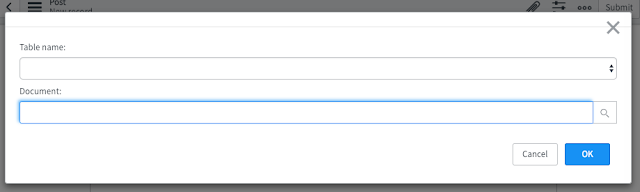
There are multiple ways to implement one-to-many relationship in ServiceNow Reference Fields GlideList Document ID fields ServiceNow has provided "Document ID" field to hold a reference of any table because at some times we have a requirement to hold the reference irrespective of the table. Document ID lets the user choose the table and the associated record
Use splice() instead of delete for arrays in JS
- Get link
- X
- Other Apps
By
Nishant Nigam
-
var words = ["Hello", "World", "and", "some", "random", "text"] console.log(words.length); // returns 6 delete words[2] console.log(words.length); // returns 6 Delete replaces the item with "undefined" instead of the removing it from the array The correct approach to remove an item from an array is to use "splice", The splice() method adds/removes items to/from an array, and returns the removed item(s) Syntax array.splice(index, howmany, item1, ....., itemX) var words = ["Hello", "World", "and", "some", "random", "text"] console.log(words.length); // returns 6 words.splice(2, 1) console.log(words.length); // returns 5
Find duplicate records in ServiceNow
- Get link
- X
- Other Apps
By
Nishant Nigam
-
Find duplicate records using GlideAggregate and groupBy var importGR = new GlideAggregate('u_import'); importGR.addAggregate('COUNT', 'u_number'); importGR.addNotNullQuery('u_number'); importGR.groupBy('u_number'); importGR.addHaving('COUNT', '>', 1); importGR.query(); while (importGR.next()) { gs.log(importGR.u_number); }
Why to use get(key) instead of [key] for Python Dictionary?
- Get link
- X
- Other Apps
By
Nishant Nigam
-
Accessing value from a dictionary using square brackets will raise an exception if there is no value mapped to that key, here is an example >>> dict = {'key1':1,'key2':2} >>> dict['key1'] 1 >>> dict['key3'] Traceback (most recent call last): File "", line 1, in dict['key3'] KeyError: 'key3' On the other hand, 'get' will return the default value if there is no value mapped to that key, the default value is 'None' by default >>> dict = {'key1':1,'key2':2} >>> dict['key1'] 1 >>> a = dict.get('key3) >>> print a 0 To set a custom default value >>> a = dict.get('key3', 'MyCustomValue')